
Asia/Jakarta
Projects

Building a PPID Information Management System with Odoo 19

Building a PPID Information Management System with Odoo 19
December 10, 2025
GitHub Repository:
Bash
git clone https://github.com/Afrizal236/odoo-ppid19.git
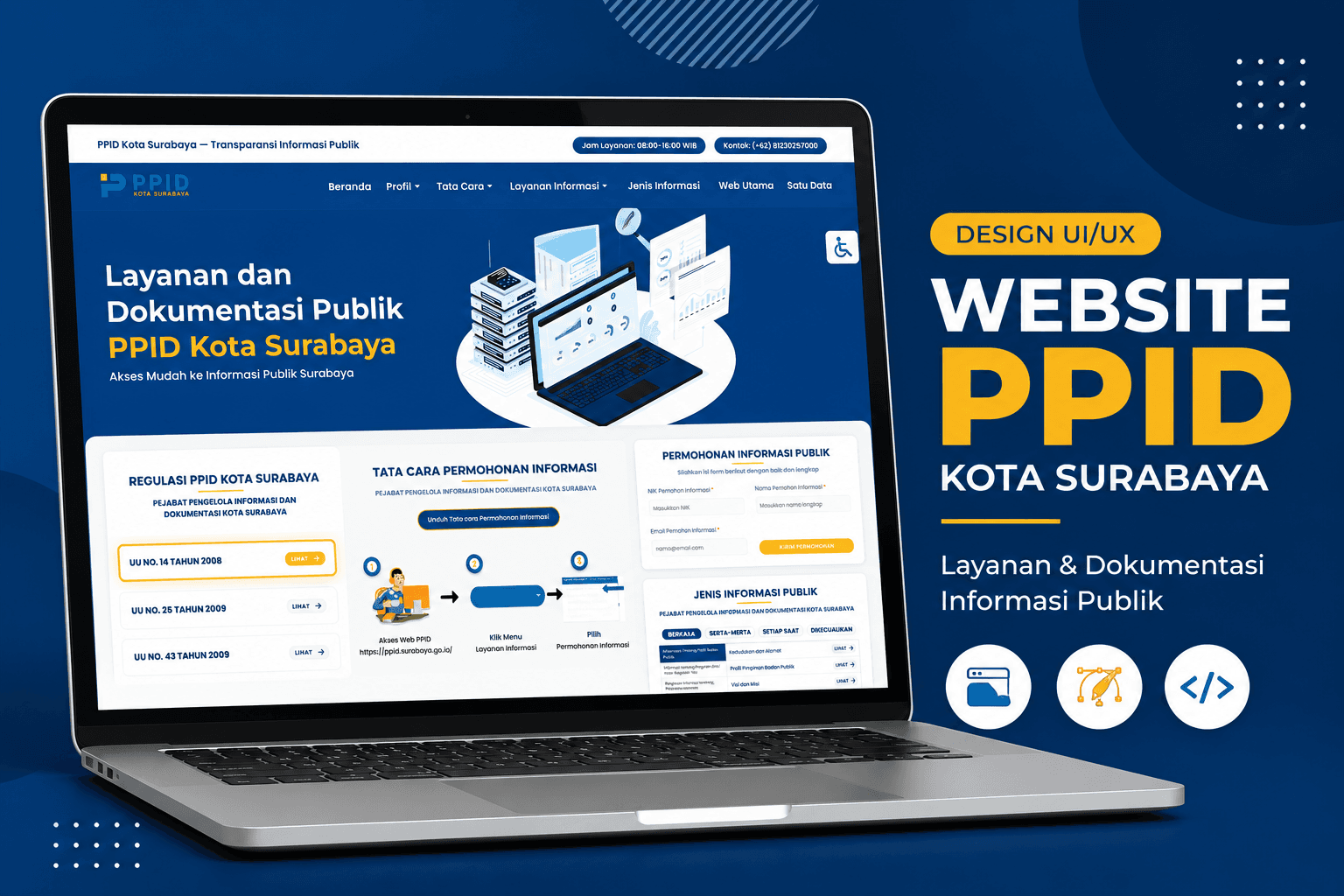
Managing public information requests in a government institution involves more than just a form — it requires structured projectsflows, traceable audit logs, legal compliance, and multi-role access control. Building this on a generic CRUD system leaves critical gaps. Building it on Odoo means inheriting 20+ years of enterprise ERP tooling from day one. PPID Surabaya is a custom Odoo 19 module built for the Pejabat Pengelola Informasi dan Dokumentasi (Public Information and Documentation Officer) of Kota Surabaya — the government body responsible for managing public information access requests under Indonesian information transparency law (UU KIP No. 14/2008). The system handles the full lifecycle of public information services: from citizen registration and information requests (permohonan), through objection filing (keberatan), up to formal dispute resolution (sengketa) — all with email notifications, document attachments, status tracking, and a public-facing website built with Odoo QWeb. This article walks through the architecture: from Docker-based deployment and custom model design to REST API structure and Laravel-to-QWeb template migration.
+--------------------+     +----------------------+     +-------------------+
|   Public Website   |     |   Odoo Backend       |     |   Database        |
|   (QWeb Frontend)  |     |   (Custom Module)    |     |   (PostgreSQL 16) |
|                    |     |                      |     |                   |
| Beranda            |<--->| ppid.permohonan      |<--->| permohonan        |
| Permohonan Form    |     | ppid.keberatan       |     | keberatan         |
| Keberatan Form     |     | ppid.sengketa        |     | sengketa          |
| Status Tracking    |     | REST API Controllers |     | tanggapan         |
| Profil PPID        |     | Wizard (Email)       |     | users / partners  |
+--------------------+     +----------------------+     +-------------------+
         |                          |
         +--------[ Docker ]---------+
              odoo:18.0 + postgres:16

The project separates infrastructure (Docker) from the Odoo custom addon, keeping concerns clean.
odoo-ppid19/
├── docker-compose.yml          # Docker stack (Odoo + PostgreSQL)
├── .gitignore
├── README.md
└── addons/
    └── ppid/
        ├── __manifest__.py         # Module manifest & dependencies
        ├── __init__.py
        ├── controllers/
        │   ├── api_controller.py   # REST API (permohonan, keberatan, tanggapan)
        │   ├── auth_controller.py  # Auth, register, profile endpoints
        │   ├── main_controller.py  # Main web controller
        │   └── website_controller.py
        ├── models/
        │   ├── permohonan.py       # Information request model
        │   ├── keberatan.py        # Objection model
        │   ├── sengketa.py         # Dispute resolution model
        │   ├── sidang.py           # Hearing/session model
        │   ├── tanggapan.py        # Response to permohonan
        │   ├── tanggapan_keberatan.py
        │   ├── kategori.py         # Information category
        │   ├── kategori_pemohon.py # Applicant category
        │   ├── alasan_pengajuan.py # Objection reasons
        │   ├── res_users.py        # Extended user model
        │   └── res_partner.py      # Extended partner model
        ├── views/
        │   ├── beranda.xml         # Home page
        │   ├── navbar.xml          # Navigation bar
        │   ├── footer.xml          # Footer
        │   ├── permohonan_views.xml
        │   ├── keberatan_views.xml
        │   ├── sengketa_views.xml
        │   ├── profil/             # Profile subpages
        │   ├── layanan/            # Service subpages
        │   └── tata_cara/         # Procedure subpages
        ├── wizard/
        │   ├── penerimaan.py       # Accept wizard (email)
        │   └── penolakan.py        # Reject wizard (email)
        ├── security/
        │   ├── ppid_security.xml   # Groups: Staff & Manager
        │   └── ir.model.access.csv
        ├── data/
        │   └── website_pages.xml
        └── static/
            └── src/
                ├── css/            # Custom stylesheets
                └── js/             # Custom JavaScript
The entire stack runs in Docker with two services — Odoo and PostgreSQL — wired together via docker-compose.yml.
Yaml
# docker-compose.yml
version: "3.9"

services:
  db:
    image: postgres:16
    container_name: odoo19-db
    environment:
      - POSTGRES_DB=postgres
      - POSTGRES_USER=odoo
      - POSTGRES_PASSWORD=odoo
    volumes:
      - odoo19-db-data:/var/lib/postgresql/data
    restart: always

  odoo:
    image: odoo:18.0
    container_name: odoo19-app
    depends_on:
      - db
    ports:
      - "8069:8069"
    environment:
      - HOST=db
      - USER=odoo
      - PASSWORD=odoo
    volumes:
      - ./addons:/mnt/extra-addons
    restart: always

volumes:
  odoo19-db-data:
Bash
# Start the full stack
docker-compose up -d

# Access the application
# http://localhost:8069

The __manifest__.py declares module metadata, dependencies, and lists every XML data file to be loaded.
Python
# addons/ppid/__manifest__.py
{
    'name': "ppid",
    'author': "PPID Surabaya",
    'website': "https://www.surabaya.com",
    'category': 'website',
    'version': '19.0.1',
    'license': 'LGPL-3',

    'depends': ['base', 'website', 'mail', 'auth_signup'],

    'data': [
        'security/security.xml',
        'security/ir.model.access.csv',
        'views/permohonan_views.xml',
        'views/keberatan_views.xml',
        'views/sengketa_views.xml',
        # Website Frontend
        'views/navbar.xml',
        'views/footer.xml',
        'views/beranda.xml',
        'views/profil/regulasi.xml',
        'views/layanan/permohonan-informasi.xml',
        'views/tata_cara/tata-cara-permohonan-informasi.xml',
        # ...
        'wizard/penerimaan_views.xml',
        'wizard/penolakan_views.xml',
    ],

    'assets': {
        'web.assets_frontend': [
            'ppid/static/src/css/style.css',
            'ppid/static/src/css/custom.css',
            'ppid/static/src/js/custom.js',
            'ppid/static/src/js/accessibility.js',
        ],
    },

    'installable': True,
    'application': True,
}
Key dependencies:
  • base — Core Odoo models
  • website — QWeb website engine and routing
  • mail — Chatter, followers, email notifications (mail.thread)
  • auth_signup — Public user registration support

The ppid.permohonan model is the backbone of the system. It tracks the full lifecycle of a citizen's public information request, inheriting mail.thread for chatter and audit logging.
Python
# models/permohonan.py
class Permohonan(models.Model):
    _name = "ppid.permohonan"
    _description = "Permohonan"
    _inherit = ['mail.thread', 'mail.activity.mixin']

    name = fields.Char(string='No Ticket', translate=True)
    no_registrasi = fields.Char(string='No. Register')
    nama_pemohon = fields.Char(string='Nama Pemohon', required=True, tracking=True)
    nik_pemohon = fields.Char(string='NIK', tracking=True)
    email_pemohon = fields.Char(string='Email Pemohon', required=True, tracking=True)
    no_telp = fields.Char(string='No. Telp', tracking=True)
    alamat_pemohon = fields.Text(string='Alamat Pemohon', required=True, tracking=True)
    atas_nama = fields.Char(string='Bertindak Atas Nama', required=True, tracking=True)

    informasi_dibutuhkan = fields.Text(string='Informasi yang Dibutuhkan', required=True, tracking=True)
    tujuan_informasi = fields.Text(string='Tujuan Informasi', required=True, tracking=True)

    cara_memperoleh_informasi = fields.Selection(
        [('langsung', 'Langsung'), ('pos', 'POS'), ('fax', 'Fax'), ('email', 'Email')],
        string="Cara Memperoleh Informasi", tracking=True)

    status = fields.Selection([
        ('verifikasi', 'Verifikasi Data'),
        ('permohonan_diproses', 'Permohonan Diproses'),
        ('permohonan_dikabulkan_sebagian', 'Permohonan Dikabulkan Sebagian'),
        ('permohonan_dikabulkan_seluruhnya', 'Permohonan Dikabulkan Seluruhnya'),
        ('permohonan_ditolak', 'Permohonan Ditolak'),
    ], default='verifikasi', tracking=True)

    bentuk_informasi = fields.Selection(
        [('tercetak', 'Tercetak'), ('terekam', 'Terekam')], tracking=True)

    bukti_kelengkapan = fields.Binary("Bukti Kelengkapan", attachment=True)
    tanggapan_ids = fields.One2many('ppid.tanggapan', 'permohonan_id', string='Tanggapan')

    tanggal_permohonan = fields.Datetime('Tanggal Permohonan', tracking=True)
    tanggal_expired = fields.Datetime(
        'Tanggal Expired',
        default=lambda r: fields.Date.today() + relativedelta(days=3))
The permohonan status follows a linear approval flow triggered by action buttons:
verifikasi
    │
    ▼  [Proses]
permohonan_diproses
    │
    ├──▶ [Terima]  permohonan_dikabulkan_seluruhnya
    ├──▶ [Terima Sebagian]  permohonan_dikabulkan_sebagian
    └──▶ [Tolak]   permohonan_ditolak
Python
def set_diproses(self):
    if self.name and not self.no_registrasi:
        split = self.name.split('/')
        no_registrasi = split[0] + '/PPID/' + split[1] + '/' + split[2]
        self.write({'no_registrasi': no_registrasi})
    self.write({
        'status': 'permohonan_diproses',
        'tanggal_permohonan': fields.Date.today(),
        'tanggal_expired': False
    })

def set_diterima(self):
    # Opens email acceptance wizard
    return {
        'name': _('Email Penerimaan'),
        'type': 'ir.actions.act_window',
        'res_model': 'ppid.wizard.penerimaan',
        'view_mode': 'form',
        'target': 'new',
        'context': {'default_res_id': self.ids[0]},
    }
When a permohonan is denied or unsatisfactory, citizens can file a ppid.keberatan. The sequence number is auto-generated in Roman numeral format.
Python
# models/keberatan.py
class Keberatan(models.Model):
    _name = "ppid.keberatan"
    _description = "Keberatan"
    _inherit = 'mail.thread'

    status = fields.Selection([
        ('verifikasi', 'Verifikasi Data'),
        ('permohonan_diproses', 'Permohonan Diproses'),
        ('keputusan_atasan', 'Keputusan Atasan'),
    ], default='verifikasi', tracking=True)

    alasan_pengajuan_id = fields.Many2many(
        'ppid.alasan_pengajuan', string='Alasan Pengajuan', tracking=True)

    @api.model
    def create(self, vals):
        romawi = ['I', 'II', 'III', 'IV', 'V', 'VI', 'VII', 'VIII', 'IX', 'X', 'XI', 'XII']
        no_ticket = self.env['ir.sequence'].next_by_code('ppid.keberatan')
        split = no_ticket.split('/')
        no_ticket_fmt = split[3] + '/' + split[0] + '/' + romawi[int(split[1]) - 1] + '/' + split[2]
        vals['name'] = no_ticket_fmt
        vals['tanggal_keberatan'] = datetime.now().strftime('%Y-%m-%d %H:%M')
        return super().create(vals)
If an objection is not resolved satisfactorily, citizens may escalate to ppid.sengketa — a formal dispute with hearing sessions tracked via ppid.sidang.
Python
# models/sengketa.py
class Sengketa(models.Model):
    _name = "ppid.sengketa"
    _description = "Sengketa"
    _inherit = ['mail.thread', 'mail.activity.mixin']

    pemohon = fields.Char("Pemohon")
    termohon = fields.Char("Termohon")
    permohonan_id = fields.Many2one('ppid.permohonan', string='Permohonan')
    keberatan_id = fields.Many2one('ppid.keberatan', string='Keberatan')
    sidang_ids = fields.One2many('ppid.sidang', 'sengketa_id', string='Sidang')

    amar_putusan = fields.Selection(
        [('proses', 'Proses'), ('selesai', 'Selesai')],
        default='proses', tracking=True)

    status = fields.Selection([
        ('draft', 'Draft'), ('proses', 'Proses'), ('selesai', 'Selesai')
    ], default='draft', tracking=True)
res.users
    │
    ├──▶ ppid.permohonan ──▶ ppid.tanggapan
    │         │
    │         └──▶ ppid.sengketa ──▶ ppid.sidang
    │
    └──▶ ppid.keberatan ──▶ ppid.tanggapan_keberatan
              │
              └──▶ ppid.sengketa

The module exposes a full JSON/HTTP API under /api/*. Authentication uses token-based access from the restful addon (with graceful fallback to session-based auth).
POST  /api/auth/token        # Get access token (login + password + db)
POST  /api/register          # Register new citizen account
GET   /api/profile           # Get current user profile
POST  /api/gantipassword     # Change user password
GET   /api/permohonan                # List user's permohonan (paginated, 20/page)
POST  /api/permohonan/create         # Submit new permohonan
GET   /api/permohonan/<id>           # Get single permohonan detail
GET   /api/keberatan                 # List user's keberatan (paginated)
POST  /api/keberatan/create          # Submit new keberatan
GET   /api/keberatan/<id>            # Get single keberatan detail
GET   /api/tanggapan?permohonan_id=  # Get responses for a permohonan
POST  /api/tanggapan/create          # Add response to permohonan
GET   /api/tanggapan_keberatan?keberatan_id=
POST  /api/tanggapan_keberatan/create
GET   /api/alasan_pengajuan          # List objection reasons (public)
Python
# controllers/api_controller.py
@validate_token
@http.route('/api/permohonan/create', type='http', auth='none',
            methods=['POST'], website=True, csrf=False)
def permohonan_create(self, **post):
    romawi = ['I', 'II', 'III', 'IV', 'V', 'VI', 'VII', 'VIII', 'IX', 'X', 'XI', 'XII']
    no_ticket = http.request.env['ir.sequence'].sudo().next_by_code('ppid.permohonan')
    split = no_ticket.split('/')
    no_ticket = split[2] + '/' + romawi[int(split[0]) - 1] + '/' + split[1]

    permohonan = http.request.env['ppid.permohonan'].sudo().create({
        'name': no_ticket,
        'tanggal_permohonan': datetime.now().strftime('%Y-%m-%d %H:%M'),
        'nama_pemohon': post.get('nama_pemohon'),
        'nik_pemohon': post.get('nik_pemohon'),
        'email_pemohon': post.get('email_pemohon'),
        'informasi_dibutuhkan': post.get('informasi_dibutuhkan'),
        'tujuan_informasi': post.get('tujuan_informasi'),
        'user_id': request.env.user.id,
    })

    return werkzeug.wrappers.Response(
        status=200,
        content_type="application/json; charset=utf-8",
        response=json.dumps({
            "status": "success",
            "data": {
                "id": permohonan.id,
                "no_ticket": permohonan.name,
                "tanggal_permohonan": convert_timezone(permohonan.tanggal_permohonan)
            }
        }),
    )
Python
# Graceful fallback if 'restful' addon is not installed
try:
    from odoo.addons.restful.common import validate_token, valid_response, invalid_response
except Exception:
    def validate_token(func):
        return func  # No-op decorator: passes all requests through

The entire frontend was migrated from a Laravel Blade application to Odoo QWeb templates while preserving the exact same design system. | Laravel Blade | Odoo QWeb | Notes | | -------------------------------- | ------------------------------------ | ---------------------- | | @include('partials.navbar') | <t t-call="ppid.custom_navbar"/> | Reusable template call | | @include('partials.footer') | <t t-call="ppid.custom_footer"/> | Reusable template call | | {{ route('permohonan') }} | /permohonan | Static URL | | {{ asset('images/logo.png') }} | /ppid/static/src/img/logo_ppid.png | Static asset path | | @php ... @endphp | (removed) | Not needed in QWeb | | @if ($condition) | <t t-if="condition"> | QWeb conditional | | @foreach ($items as $item) | <t t-foreach="items" t-as="item"> | QWeb loop |
/beranda                        # Home page with hero, services, procedures
/profil/seputar-ppid            # About PPID
/profil/struktur-organisasi     # Organizational structure
/profil/visi-misi               # Vision & mission
/profil/regulasi                # Regulations
/profil/jadwal-layanan          # Service schedule
/profil/standar-layanan         # Service standards
/tata-cara/permohonan-informasi # How to request information
/tata-cara/pengajuan-keberatan  # How to file an objection
/layanan/permohonan-informasi   # Request information form
/layanan/permohonan-keberatan   # File objection form
/layanan/laporan-layanan-informasi # Service reports
Xml
<!-- views/navbar.xml -->
<template id="custom_navbar" name="PPID Navbar">
  <nav class="ppid-navbar" t-attf-class="#{sticky_class}">
    <div class="navbar-container">
      <a href="/beranda" class="navbar-brand">
        <img src="/ppid/static/src/img/logo_ppid.png" alt="PPID Logo"/>
      </a>
      <ul class="navbar-menu">
        <li class="dropdown">
          <a href="#" class="dropdown-toggle">Profil</a>
          <ul class="dropdown-menu">
            <li><a href="/profil/seputar-ppid">Seputar PPID</a></li>
            <li><a href="/profil/visi-misi">Visi &amp; Misi</a></li>
            <li><a href="/profil/struktur-organisasi">Struktur Organisasi</a></li>
          </ul>
        </li>
        <li><a href="/layanan/permohonan-informasi">Layanan Informasi</a></li>
      </ul>
    </div>
  </nav>
</template>
Css
/* static/src/css/custom.css — CSS Variables */
:root {
  --primary-dark: #063d6e;
  --primary-blue: #0b5394;
  --primary-light: #0d5a9e;
  --accent-yellow: #ffc94d;
  --text-primary: #0f3b61;
  --text-muted: #5b6f81;
  --text-light: #d6e5f1;
}

/* Sticky navbar on scroll */
.ppid-navbar.sticky {
  position: fixed;
  top: 0;
  box-shadow: 0 2px 20px rgba(6, 61, 110, 0.15);
  backdrop-filter: blur(10px);
}

/* Hero section animation */
@keyframes fadeInUp {
  from {
    opacity: 0;
    transform: translateY(30px);
  }
  to {
    opacity: 1;
    transform: translateY(0);
  }
}

/* Floating icon animation */
@keyframes float {
  0%,
  100% {
    transform: translateY(0px);
  }
  50% {
    transform: translateY(-15px);
  }
}

When a PPID officer accepts or rejects a permohonan, a wizard pops up allowing them to compose and send a notification email to the applicant — powered by Odoo's mail.compose.message.
Python
# models/permohonan.py
def set_diterima(self):
    self.ensure_one()
    ctx = {
        'default_res_model': 'ppid.permohonan',
        'default_res_id': self.ids[0],
        'mail_penerimaan_follower_channel_only': False
    }
    return {
        'name': _('Email Penerimaan'),
        'type': 'ir.actions.act_window',
        'res_model': 'ppid.wizard.penerimaan',
        'view_mode': 'form',
        'target': 'new',
        'context': ctx,
    }

The module defines two role groups for backend access:
Xml
<!-- security/ppid_security.xml -->
<record id="group_ppid_staff" model="res.groups">
    <field name="name">Staff</field>
    <field name="category_id" ref="module_category_ppid"/>
</record>

<record id="group_ppid_manager" model="res.groups">
    <field name="name">Manager</field>
    <field name="category_id" ref="module_category_ppid"/>
    <field name="implied_ids" eval="[(4, ref('group_ppid_staff'))]"/>
</record>
| Model | Public | Staff | Manager | | ----------------------- | ----------- | ---------- | ------- | | ppid.permohonan | Create only | Read/Write | Full | | ppid.keberatan | Create only | Read/Write | Full | | ppid.sengketa | — | Read | Full | | ppid.tanggapan | Read | Read/Write | Full | | ppid.alasan_pengajuan | Read | Read | Full |
Permohonan that are stuck in verification auto-expire after 3 days using a date default:
Python
tanggal_expired = fields.Datetime(
    'Tanggal Expired',
    default=lambda record: fields.Date.today() + relativedelta(days=3)
)

def set_unarchive(self):
    # Reactivate and reset expiry on un-archive
    self.write({
        'active': True,
        'tanggal_expired': fields.Date.today() + relativedelta(days=3)
    })
All datetime fields are converted to the user's local timezone before returning via API:
Python
def convert_timezone(date_field):
    user = request.env.user
    if user.tz and date_field:
        tz = pytz.timezone(user.tz) or pytz.utc
        date_field = pytz.utc.localize(date_field).astimezone(tz)
    return date_field.strftime('%d-%m-%Y %H:%M')
Every status change and tanggapan is logged to Odoo's chatter automatically via mail.thread:
Python
def message_post(self, **kwargs):
    body = kwargs.get('body', '')
    user = self.env.user
    # Auto-create tanggapan record from chatter post
    self.env['ppid.tanggapan'].create({
        'tanggapan': body,
        'user_id': user.id,
        'tanggal_tanggapan': fields.Datetime.now(),
        'permohonan_id': self.id
    })
    return super().message_post(**kwargs)
| Feature | Laravel (Original) | Odoo (This Project) | | ----------------- | ------------------ | -------------------------- | | Frontend Template | Blade | QWeb | | ORM | Eloquent | Odoo ORM | | Auth | Laravel Sanctum | auth_signup + REST token | | Admin Panel | Custom | Odoo Backend | | Email | Laravel Mail | Odoo Mail (chatter) | | File Storage | Laravel Storage | Odoo Binary Attachment | | API | Custom REST | /api/* HTTP routes | | Audit Trail | Manual logging | mail.thread chatter |
Bash
# 1. Clone the repository
git clone https://github.com/Afrizal236/odoo-ppid19.git
cd odoo-ppid19

# 2. Start the Docker stack
docker-compose up -d

# 3. Access Odoo
# http://localhost:8069

# 4. Create a database, then install the 'ppid' module from Apps menu
After installation, navigate to:
  • Backend: http://localhost:8069/web → Apps → PPID
  • Frontend: http://localhost:8069/beranda

Converting a Laravel-based government information system to Odoo is not just a frameprojects migration — it is an architectural upgrade. By building on Odoo 19, the PPID Surabaya system inherits enterprise-grade capabilities out of the box: role-based access control, email notifications with attachments, audit trails via chatter, and a fully responsive public website. The key lesson from this project: leverage the frameprojects instead of fighting it. Every projectsflow wizard, chatter integration, and QWeb template replaced dozens of custom lines that would need maintenance indefinitely. The result is a lean, maintainable, and legally compliant public information management system that can be extended without rewriting the core.