
Asia/Jakarta
Projects

Building a Real-Time Chat Application with File Sharing using React and Node.js

Building a Real-Time Chat Application with File Sharing using React and Node.js
August 20, 2025
GitHub Repository:
Bash
git clone https://github.com/Afrizal236/chatapp.git
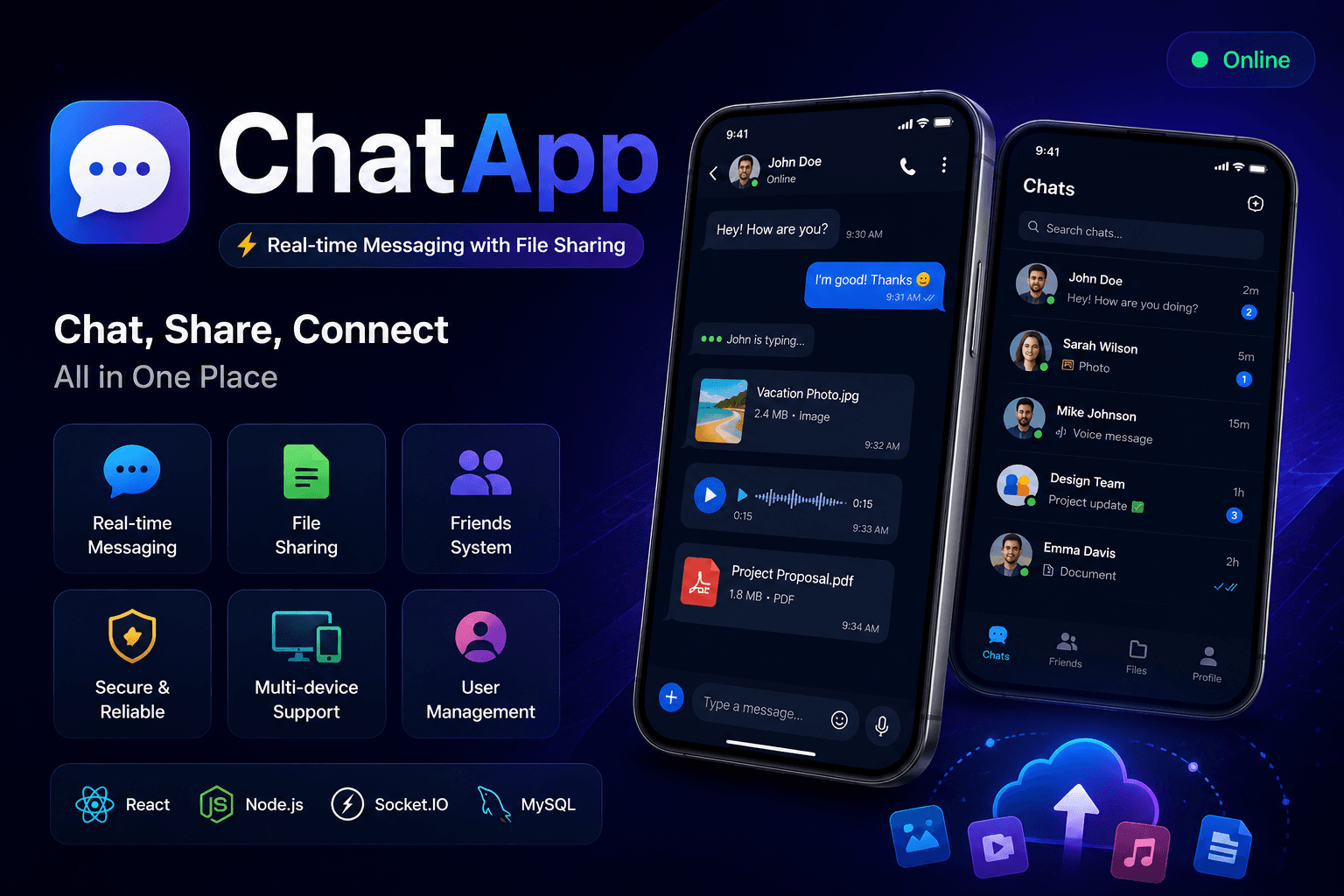
Building a chat app that sends a message is easy. Building one that handles real-time delivery, typing indicators, read receipts, multi-format file sharing, and seamless session persistence across devices — that is where full-stack engineering gets serious. ChatApp bridges this gap — a modern, feature-rich messaging platform built with React on the frontend and a hybrid NestJS + Pure Node.js backend, connected in real time via Socket.IO. Every message, every file, every online status update propagates instantly across all connected clients without a single page refresh. This article covers the complete architecture: from hybrid backend design and Socket.IO event handling to file upload organization and multi-device session management.
+----------------+     +----------------+     +----------------+
|   Frontend     |     |   Backend      |     |   Database     |
|   (React)      |     |   (Hybrid)     |     |   (MySQL)      |
|                |     |                |     |                |
| Chat UI        |<--->| NestJS         |<--->| Users          |
| File Upload    |     | Pure Node.js   |     | Sessions       |
| Socket Client  |     | Socket.IO      |     | Friends        |
+----------------+     +----------------+     +----------------+

The project is organized into two main directories — frontend and backend — with a clear separation of concerns.
chatapp/
├── frontend/
│   ├── src/
│   │   ├── components/
│   │   ├── services/
│   │   │   ├── api.js         # API client
│   │   │   └── socket.js      # Socket.IO client
│   │   └── App.js             # Main application
│   └── package.json
├── backend/
│   ├── src/
│   │   ├── auth/              # Authentication (NestJS)
│   │   ├── upload/            # File upload (NestJS)
│   │   ├── debug/             # Debug tools (NestJS)
│   │   ├── routes/            # API routes (Node.js)
│   │   ├── models/            # Database models
│   │   ├── socket/            # Socket.IO handlers
│   │   └── config/            # Database config
│   ├── uploads/               # File storage
│   │   ├── send/              # Public uploads
│   │   ├── private/           # Private uploads
│   │   └── profile-images/    # Profile pictures
│   └── package.json
└── README.md
Bash
# Backend .env
DB_HOST=localhost
DB_USER=root
DB_PASSWORD=your_password
DB_NAME=chatapp_db
DB_PORT=3306
JWT_SECRET=your-super-secret-jwt-key
NODE_ENV=development
PORT=5000

ChatApp uses a deliberate hybrid backend — NestJS handles structured concerns like authentication and file uploads, while Pure Node.js manages the real-time messaging layer.
Typescript
// main.ts — NestJS bootstrap with CORS
import { NestFactory } from '@nestjs/core';
import { AppModule } from './app.module';

async function bootstrap() {
  const app = await NestFactory.create(AppModule);

  app.enableCors({
    origin: ['http://localhost:3000'],
    credentials: true,
  });

  await app.listen(5000);
}
bootstrap();
Javascript
// socket/index.js — Socket.IO server setup
const { Server } = require('socket.io');

const io = new Server(server, {
  cors: {
    origin: 'http://localhost:3000',
    credentials: true,
  },
});

io.on('connection', (socket) => {
  console.log('User connected:', socket.id);

  socket.on('join_user', ({ userId, userInfo }) => {
    socket.join(`user_${userId}`);
    io.emit('user_online_status', { userId, status: 'online' });
  });

  socket.on('disconnect', () => {
    io.emit('user_online_status', { userId: socket.userId, status: 'offline' });
  });
});

Socket.IO handles all bidirectional communication between clients and the server — messages, typing indicators, and online status updates all flow through this layer.
Javascript
// Client to Server
socket.emit('join_user',    { userId, userInfo })
socket.emit('send_message', { chatId, content, fileUrl, fileType })
socket.emit('typing_start', { chatId, userId })
socket.emit('typing_stop',  { chatId, userId })

// Server to Client
socket.on('new_message',        (message) => { ... })
socket.on('user_typing',        (data)    => { ... })
socket.on('user_online_status', (data)    => { ... })
socket.on('message_read',       (data)    => { ... })
Javascript
// services/socket.js
const sendMessage = (chatId, content, fileData = null) => {
  socket.emit('send_message', {
    chatId,
    content,
    fileUrl:  fileData?.url  || null,
    fileType: fileData?.type || null,
    timestamp: new Date().toISOString(),
  });
};

// Message deduplication on receive
const messageIds = new Set();

socket.on('new_message', (message) => {
  if (messageIds.has(message.id)) return; // Ignore duplicate
  messageIds.add(message.id);
  setMessages((prev) => [...prev, message]);
});
Javascript
// Emit typing events with debounce
let typingTimeout;

const handleTyping = (chatId, userId) => {
  socket.emit('typing_start', { chatId, userId });

  clearTimeout(typingTimeout);
  typingTimeout = setTimeout(() => {
    socket.emit('typing_stop', { chatId, userId });
  }, 1000);
};

ChatApp supports multi-format file uploads organized into structured storage directories, with per-type size limits enforced on the backend.
Javascript
// Backend file upload configuration
const maxSizes = {
  image:    10  * 1024 * 1024,  // 10MB  — JPG, PNG, GIF, WebP
  video:    100 * 1024 * 1024,  // 100MB — MP4, AVI, MOV, WebM
  audio:    20  * 1024 * 1024,  // 20MB  — MP3, WAV, OGG, M4A
  document: 25  * 1024 * 1024,  // 25MB  — PDF, DOC, XLS, TXT
};
uploads/
├── send/              # Files from senders
│   ├── images/
│   ├── videos/
│   ├── audios/
│   └── documents/
├── private/           # Files for receivers
│   ├── images/
│   ├── videos/
│   ├── audios/
│   └── documents/
├── profile-images/    # User avatars
└── thumbnails/        # Generated previews
Javascript
// React drag and drop upload handler
const handleDrop = async (event) => {
  event.preventDefault();
  const files = Array.from(event.dataTransfer.files);

  for (const file of files) {
    const formData = new FormData();
    formData.append('file', file);

    const response = await fetch('/upload/message-file', {
      method: 'POST',
      body: formData,
    });

    const { fileUrl, fileType } = await response.json();
    sendMessage(chatId, '', { url: fileUrl, type: fileType });
  }
};

POST /register              # Register new user
POST /auto-login            # Auto-login with session
GET  /check-username        # Check username availability
GET  /check-phone           # Check phone availability
GET  /users                 # Get all users
GET  /search-users          # Search users by keyword
POST /friends/add-by-phone  # Add friend by phone number
GET  /friends               # Get friends list
POST /upload/message-file   # Upload file for messaging
POST /upload/profile-image  # Upload profile picture
GET  /upload/storage-stats  # Get storage statistics
GET  /uploads/*             # Access uploaded files
GET  /debug/files           # File system debug info
GET  /debug/storage-stats   # Storage statistics
GET  /health                # System health check

Instead of requiring users to log in every time, persist sessions using JWT stored in localStorage:
Javascript
// Auto-login on app startup
const autoLogin = async () => {
  const token = localStorage.getItem('session_token');
  if (!token) return;

  const response = await fetch('/auto-login', {
    method: 'POST',
    headers: { Authorization: `Bearer ${token}` },
  });

  if (response.ok) {
    const user = await response.json();
    setCurrentUser(user);
  }
};
Avoid opening a new database connection per request by using a connection pool:
Javascript
// config/database.js
const mysql = require('mysql2/promise');

const pool = mysql.createPool({
  host:            process.env.DB_HOST,
  user:            process.env.DB_USER,
  password:        process.env.DB_PASSWORD,
  database:        process.env.DB_NAME,
  waitForConnections: true,
  connectionLimit:    10,
  queueLimit:         0,
});

module.exports = pool;
| File Type | Formats | Max Size | Storage Path | |-----------|---------|----------|--------------| | Image | JPG, PNG, GIF, WebP | 10MB | uploads/send/images | | Video | MP4, AVI, MOV, WebM | 100MB | uploads/send/videos | | Audio | MP3, WAV, OGG, M4A | 20MB | uploads/send/audios | | Document | PDF, DOC, XLS, TXT | 25MB | uploads/send/documents |
The journey from a simple messaging form to a production-ready real-time chat application requires careful architecture decisions at every layer — from choosing a hybrid backend to managing socket events, file storage organization, and session persistence. The key lesson from this project: real-time is not just a feature, it is the foundation. Every design decision — from the hybrid backend split to message deduplication and typing debounce — exists to ensure that the chat feels instant and reliable, no matter how many users are online simultaneously.